
Published: 2026-11-12 | Category: Tips | Author: Marcelo Santiago | Read time: 6 min read
I recommend rtk-ai/rtk: cuts 60-90% of agent tokens
rtk-ai/rtk is a Rust proxy that cuts 60-90% of the output your AI agent reads. Install in one command and reduce token spend without losing detail.

Marcelo Santiago
Criador do bridgecode
The biggest AI newsletter in the World
Get AI articles in your inbox
Technical curation on models, agents and coding tools. No spam, unsubscribe anytime.
What is rtk-ai/rtk and why it exists
Your AI agent reads everything the terminal returns. Giant logs, two-hundred-line diffs, error prints, and build outputs that tell you nothing. Most of it is irrelevant to the task at hand. And every line read costs tokens, costs money, and slows down the review loop. rtk-ai/rtk solves this.
It is a proxy, written in Rust, that sits between your code agent and the terminal. It intercepts the commands you run, applies basic filters, and returns only the essential part to the agent. The result is surprising: up to 90% fewer tokens per command, with a one-step installation and no workflow changes.
The repository is on GitHub, it is open source, uses the Apache-2.0 license, and has already amassed 86k stars with over 5k forks. The team maintains the code regularly, which indicates the project is stable and actively evolving.
In this article you will see
- What rtk-ai/rtk is and why it solves a real problem
- How output compression works
- Which agents it already works with
- How to test it in your terminal today
How output compression works
The idea behind rtk is simple. When you ask the agent to run a command, the proxy captures the raw output, applies rules, and returns only the essentials to the model. The most common example is git status. Without the proxy, a branch created with new files returns more than forty lines. With rtk, the same command comes in at three.
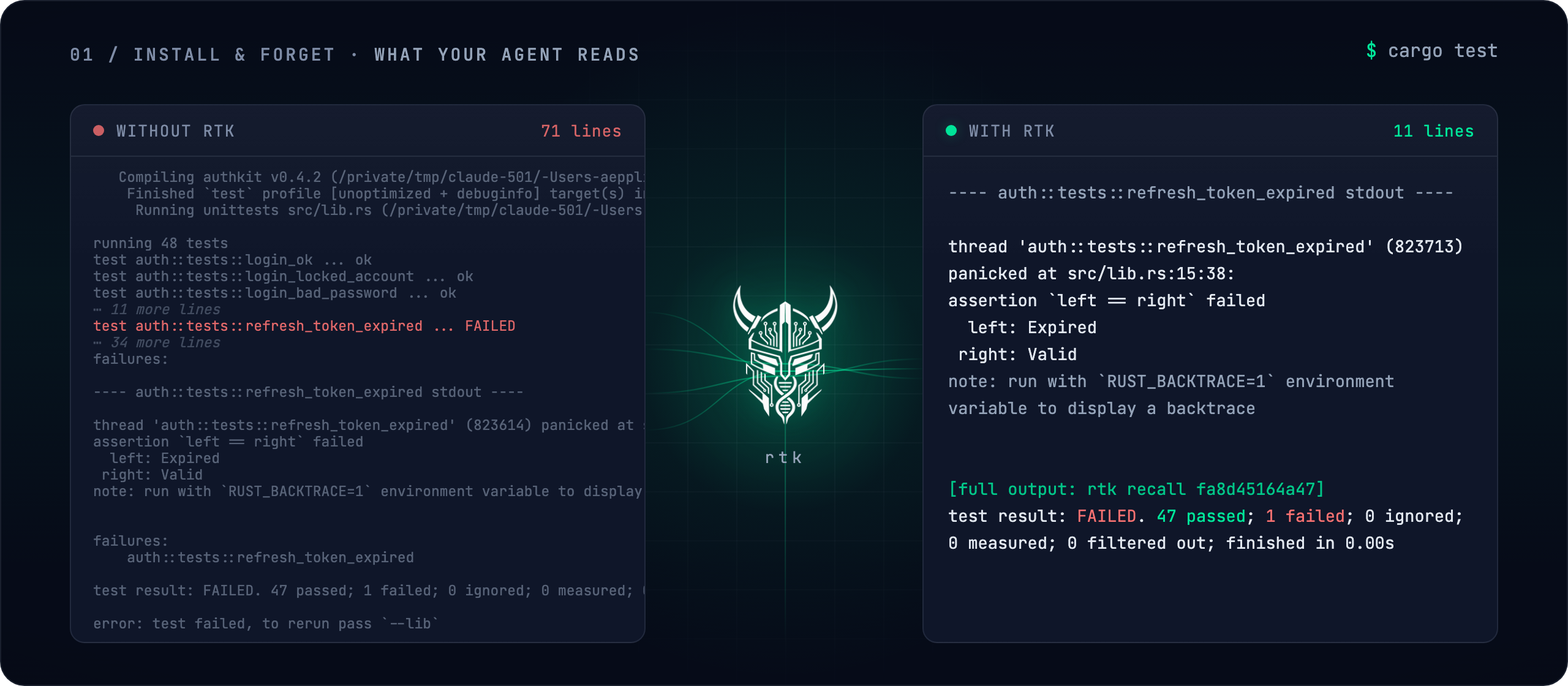
The cargo test, with seventy-one lines of logs, becomes eleven: the failure, the assertion, and a summary. The pytest, with dozens of lines of steps, becomes a result report. The command remains exactly the same. The agent just runs the proxy, which delegates to the original command. Nothing changes in the integration with your code.
In the terminal, the flow is direct:
Terminal
brew install rtk-ai/tap/rtkThen just run rtk init -g to connect your agent. From the next time the agent asks to execute a command, the proxy is active. The command rtk gain shows the savings summary, with what has been saved so far.
How the proxy behaves inside a squad
Those who work with multiple agents in parallel have the same problem that rtk solves at scale: each agent reads the output of the others. When one agent plans, another executes commands, and a third reviews the results, the amount of text circulating between them explodes. rtk connects this flow without forcing new tools. It acts on the same terminal, with the same hook, and simply trims what each one consumes.
This applies to teams using different models. One calm agent for reading JSON, another for running tests, a third for validating output. With the proxy active, what each one receives is compact. The result is faster delivery and, in the end, a project token bill smaller than the sum of three agents working separately.
Practical advantages of the proxy
Tip 1: Never blocks
If a filter fails, rtk delivers the original output as always. The command exit code remains intact, so there are no scenarios where your flow breaks because of the proxy.
Tip 2: Never makes things worse
rtk never returns more than the original command printed. Every trimmed line points to where you can recover the full output. The guarantee is simple: you remove what you don't need and recover everything that was cut whenever you want.
Tip 3: Compatible with most agents
rtk supports 18 coding tools, ranging from Claude Code and Codex to OpenCode and Kilo Code. One configuration works across multiple interpreters, making it a cost-effective choice for teams that switch between models and CLIs. For those who alternate between agents, Kilo Code publishes an inside look at the parallel flow and the OpenBot local workspace ensures isolation and batch execution. Both follow the same principle as rtk: less noise, more of what matters.
How to test rtk-ai/rtk today
You need macOS, Linux, or Windows with Homebrew, and your agent's CLI. On macOS or Linux, install with Homebrew:
Terminal
brew install rtk-ai/tap/rtkOn Windows, the winget package manager handles it:
Terminal
winget install rtk-ai.rtkOn Linux, the install script does the job. Then run rtk init -g to connect your agent and restart it. Run a test command and see the rtk gain. The full documentation, with installation steps and configuration options, is in the official docs.
What rtk just released and why it's worth it
The repository was updated recently, which shows the project isn't abandoned. The user community is active, and there's confirmation that the team is receiving fixes and new builds. For anyone following the agent ecosystem, rtk remains one of the fastest options to try.
What makes it particularly useful today is the growing number of tokens an agent reads each round. If your project runs multiple agents at once, the cost of raw output becomes a visible factor. rtk solves this with a thin, predictable layer.
Frequently asked questions about rtk-ai/rtk
What does rtk-ai/rtk do?
It's a proxy that intercepts your code agent's commands and returns a lean version of the terminal output, with ready-made filters.
Is my AI agent supported?
The project works with 18 tools, including Claude Code, Codex, OpenCode, Kilo Code, Gemini CLI, and Antigravity.
Does rtk do anything with my code or repository?
No. It only reads the output of commands you request and does not modify files or the repository.
Is the installation reversible?
Yes. It removes the hook with one command and keeps the local savings history.
What does the BUSL-1.1 notice mean?
The OSS edition is free; the commercial core follows the Apache-2.0 license with an additional guarantee. More details in editions and licensing.
Conclusion
rtk-ai/rtk is a practical, transparent filter for anyone tracking token costs in an agent workflow. The project is small, open, and its compression methodology is easy to understand, and even easier to test. If you already run multiple agents, spend a few minutes enabling the hook and check the rtk gain. What you'll see is concrete token savings, without changing a single command in your code.
Got an idea sitting idle? Put rtk-ai/rtk to work on it and build your AI agent squad at bridgecode.
Source: rtk-ai
Tags:#radar#ia
Developer and creator of bridgecode, an agentic development environment for orchestrating squads of AI agents. Helps people going from vibe coding to professional development move from idea to shipped product.
Related articles
Dicas
Kilo Code v7.8.27: the agent that organizes your workflow
Kilo Code is an open-source code agent that runs in the terminal. See what's new in v7.8.27 and how to use it in your workflow.
6 min
Dicas
OpenBot: the local workspace for AI agents
OpenBot is a local-first workspace for teams running AI agents. See what it is, how it works and how to get started.
6 min
Dicas
5 tips to automate the browser with browser-use 1.0
browser-use reached version 1.0 with a focus on CDP. See how to connect AI agents to the browser with Python automation.
6 min