
browser-use is an open source project that lets AI agents control a browser. On November 10, 2026, the project released version 1.0.0, with the subtitle "CDP is all you need", marking a significant change in architecture: the focus shifted to the Chrome DevTools Protocol (CDP) as the foundation for automation.
Dicas6 min
5 tips to automate the browser with browser-use 1.0
browser-use reached version 1.0 with a focus on CDP. See how to connect AI agents to the browser with Python automation.

Marcelo Santiago
Criador do bridgecode
The biggest AI newsletter in the World
Get AI articles in your inbox
Technical curation on models, agents and coding tools. No spam, unsubscribe anytime.
The repository is available at github.com/browser-use/browser-use, under MIT license, and is actively maintained by the browser-use team. Version 1.0 was published on November 10, 2026.
In this article you will see:
- What changed in version 1.0
- How to install and run your first agent
- How to use ultrafast mode for repetitive tasks
- How to keep the session alive between runs
- How to integrate with external language models
What changed in version 1.0
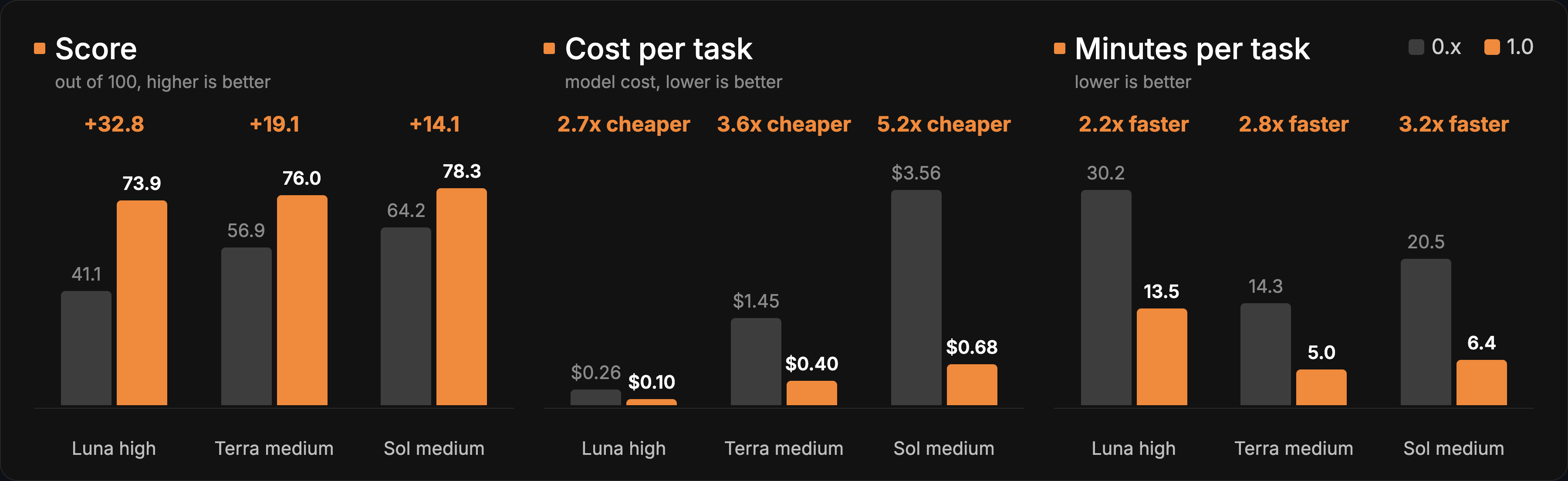
Version 1.0 brings a restructuring centered on CDP. According to the release notes, the 0.x model gateway (bu-2-0, bu-1-0, bu-latest) was discontinued. The environment variable BROWSER_USE_LLM_URL is no longer read: anyone who needs a custom endpoint should use ChatBrowserUse with base_url. LangChain models now raise TypeError instead of being silently accepted.
Another important change is the keep_alive behavior. A run after a dead browser daemon continues in the agent tab, instead of falling back to about:blank.
Version 1.0 also includes improvements to page observation, form state, file access and browser recovery, plus support for Browser Use Cloud SDK V4.
Tip 1: install and run your first agent
Installation is done via pip or uv. The project requires Python 3.11 or higher.
Terminal
pip install browser-useOr with uv:
Terminal
uv add browser-useTo run your first agent, set the model API key and run the browser-use command with a task. The project provides a CLI with five entries. The documentation includes an updated quickstart for version 1.0.
Tip 2: use ultrafast mode for repetitive tasks
Version 1.0 introduces ultrafast mode, used internally by bu-fast. According to the benchmark published in the release notes, ultrafast mode reached a score of 62.5 on BU Bench v2 (60 tasks, 3 repetitions, cloud browsers, November 9, 2026), with a cost of $0.070 per task and 650 seconds per task.
This mode is useful for repetitive tasks at scale, such as collecting data from pages or filling out forms. The mode prioritizes speed over deep reasoning, which makes it suitable for subtasks that a larger agent delegates.
Tip 3: keep the session alive between runs
The keep_alive behavior in version 1.0 allows a run to continue in the agent tab even after the browser daemon has died. This avoids losing page context between calls.
For those running agents in pipelines, this means the page state can be preserved between steps, reducing page reopening time and context reload.
Tip 4: integrate with external language models
browser-use supports integration with external language models. Version 1.0 removes silent support for LangChain models (now raises TypeError), which forces explicit configuration.
To use a custom model, pass a ChatBrowserUse instance with the base_url parameter pointing to the desired endpoint. The environment variable BROWSER_USE_LLM_URL is no longer read.
The project also offers integration with the OpenAI API and supports the MCP protocol, allowing external agents to use the browser as a tool.
Frequently asked questions about browser-use 1.0
What is browser-use?
It is an open source project that lets AI agents control a browser, available at github.com/browser-use/browser-use under the MIT license.
What license is browser-use under?
MIT, which allows commercial use and modifications.
What changed in version 1.0?
The focus shifted to the Chrome DevTools Protocol, with deprecation of the 0.x model gateway, improvements to keep_alive and page observation, and support for Cloud SDK V4.
How to install browser-use?
Via pip install browser-use or uv add browser-use, requiring Python 3.11 or higher.
Does browser-use support cloud?
Yes. It offers Browser Use Cloud for browsers at scale, with support for Cloud SDK V4 in version 1.0.
Tip 5: use Browser Use Cloud for scale
browser-use offers a cloud version (Browser Use Cloud) for those who need browsers at scale. Version 1.0 includes support for Cloud SDK V4, with updated imports.
For use cases that require dozens of simultaneous browsers, the cloud version avoids managing local infrastructure. The project documentation includes examples of use with the cloud.
Those who already use browser automation with agents can compare the browser-use flow with the Playwright CLI to test web apps with AI agents, which covers another approach to the same problem. The main difference is that browser-use focuses on control via CDP with natural language agents, while Playwright CLI offers a more direct interface for automated tests.
browser-use also integrates with the MCP protocol, allowing external agents to use the browser as a tool. This opens up possibilities for flows where one agent plans, another executes actions in the browser and a third validates the results, all in parallel.
If you already use browser-use in a project, it's worth comparing the flow with the MCP server git and with the Claude Code, which also worked on browser automation and background tasks.
Want to put browser-use to work with other agents in the same project? Build an agent squad on bridgecode that works with you every day.
Source: GitHub (browser-use/browser-use)
Tags:#radar#ia
Developer and creator of bridgecode, an agentic development environment for orchestrating squads of AI agents. Helps people going from vibe coding to professional development move from idea to shipped product.
Related articles
Dicas
MCP Inspector: How to Test and Debug MCP Servers Locally
MCP Inspector is the reference tool for testing and debugging MCP servers in the browser, CLI and terminal. See how to install and use it in CI.
7 min

Dicas
How to test Claude Fable 5.2 today on the API and in the cloud
Practical guide to test Claude Fable 5.2 on Anthropic's API and in the cloud, with steps, suggested tasks, and how to measure if it's worth it.
5 min
Dicas
Kilo Code v7.8.28: security, inline images and Agent Manager
Kilo released Kilo Code v7.8.28 with critical security fixes, inline images in chat and improvements to Agent Manager. See what changed and how to update.
5 min