
An MCP server is a program that provides tools and context to an agent through the Model Context Protocol. Instead of building a different integration for every model or app, you implement a standardized interface and let the host negotiate the connection.
How to create an MCP server in TypeScript from scratch
Create and test an MCP server in TypeScript with the current SDK, a simple tool, input validation and a local connection before hooking it up to an agent.

Marcelo Santiago
Criador do bridgecode
The biggest AI newsletter in the World
Get AI articles in your inbox
Technical curation on models, agents and coding tools. No spam, unsubscribe anytime.
In this tutorial, we will build a small server in TypeScript, advertise a tool called somar and test it with a local MCP client. The example does not access files, network or external accounts, so it is a safe start to understand the full cycle.
In this article you will see:
- The role of an MCP server
- How to create a tool in TypeScript
- How to test the local connection
- How to connect the server to a host
What is an MCP server and where it fits
MCP stands for Model Context Protocol, an open protocol for connecting AI applications to tools and context sources. The host is the application the person uses, such as an assistant or editor. It creates an MCP client, which talks to the server responsible for exposing resources and tools.
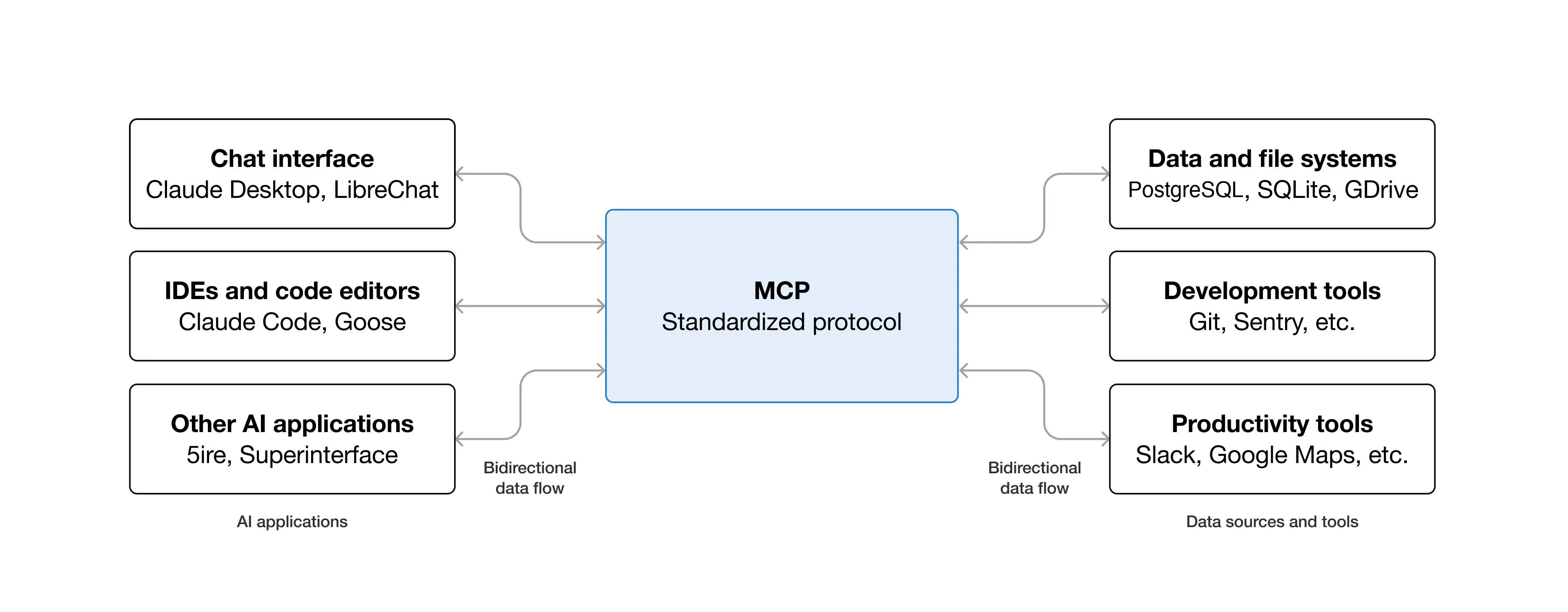
The official MCP architecture diagram shows this separation. Your server is not, by itself, an agent that decides what to do. It publishes described capabilities so a compatible host can discover them and call them.
This helps keep integration organized. One service can expose a search, another can query tasks and another can read authorized data. The host decides when to call each tool according to the conversation and the available permissions.
Before creating an MCP server in TypeScript
You need Node.js 20 or higher and a TypeScript project run with tsx. On October 27, 2026, the current versions of the MCP SDK for server and client were 2.4.0, and the package declares compatibility with Node.js starting from version 20.
The example uses Zod to validate the received arguments. This validation avoids accepting values outside the expected contract and makes the parameter description available to the MCP client.
Create a directory and initialize the package. Then use this package.json as a base and run npm install:
JSON · package.json
{
  "name": "mcp-server-demo",
  "private": true,
  "type": "module",
  "scripts": {
    "start": "tsx src/server.ts",
    "test": "tsx src/client.ts"
  },
  "dependencies": {
    "@modelcontextprotocol/client": "2.4.0",
    "@modelcontextprotocol/server": "2.4.0",
    "zod": "4.2.0"
  },
  "devDependencies": {
    "tsx": "4.23.15"
  }
}
The type enables ES modules in Node.js. The scripts call the server and client without requiring a separate build step. The current documentation for the Model Context Protocol TypeScript SDK gathers examples and migration notes for version 2.
Step 1: prepare the MCP server project
Create src/server.ts and register a tool with two numeric inputs. The server uses STDIO transport, in which protocol messages pass through the standard stream of the local process.
TypeScript · src/server.ts
import { McpServer } from "@modelcontextprotocol/server";
import { serveStdio } from "@modelcontextprotocol/server/stdio";
import { z } from "zod/v4";

serveStdio(() => {
  const server = new McpServer({ name: "servidor-mcp-demo", version: "1.0.0" });

  server.registerTool(
    "somar",
    {
      description: "Soma dois números e devolve o resultado.",
      inputSchema: z.object({
        a: z.number().describe("Primeiro número"),
        b: z.number().describe("Segundo número")
      })
    },
    async ({ a, b }) => ({
      content: [{ type: "text", text: String(a + b) }]
    })
  );

  return server;
});
McpServer organizes the capabilities published by the process. registerTool defines the name, description, input schema and the function that will be executed. The function returns a text block in the format expected by the protocol.
The example tool only calculates the sum. In a real application, replace this logic with a bounded task, such as querying an order or looking up internal information. Start with read operations and keep data mutating operations out of the first prototype.
Step 2: register the add tool
To confirm the server responds, create src/client.ts. This client starts the process over STDIO transport, lists the published tools and calls somar with values 2 and 3.
TypeScript · src/client.ts
import { Client } from "@modelcontextprotocol/client";
import { StdioClientTransport } from "@modelcontextprotocol/client/stdio";

const client = new Client({ name: "mcp-server-test", version: "1.0.0" });
const transport = new StdioClientTransport({
  command: process.execPath,
  args: ["--import", "tsx", "src/server.ts"]
});

try {
  await client.connect(transport);
  const { tools } = await client.listTools();
  console.log(`tools=${tools.map((tool) => tool.name).join(",")}`);
  const result = await client.callTool({ name: "somar", arguments: { a: 2, b: 3 } });
  console.log(`result=${result.content.map((part) => part.type === "text" ? part.text : "").join("")}`);
} finally {
  await client.close();
}
Run npm test. The expected result in this example is tools=somar and result=5. The listing confirms the client discovered the tool; the second line confirms the server processed the call and returned the content.
If the process closes without a response, first check if the directory contains src/server.ts and src/client.ts, if the packages are installed and if Node.js meets the minimum requirement. Diagnostic messages should go to stderr, not to stdout, because STDIO transport reserves the standard stream for the protocol.
How to connect the MCP server to a host
After local testing, register the process in an MCP compatible host. Each application has its own configuration format and approval policy, so follow the host specific documentation instead of copying an example from another editor.
In the guide to configure MCP in VS Code, see how to add a server to the client. To understand a MCP tool case focused on agents, also read about the Retrieve from Work IQ.
Before sharing the server, define what data it can read, who can call it and which actions require confirmation. Do not put tokens or passwords in code, in tool arguments or in log messages. If a tool changes files, sends messages or triggers payments, limit the scope and test human confirmation.
Keep descriptions short and specific. A tool called somar with inputs a and b communicates its intent better than a generic tool called executar. For each tool, say what it does, which arguments it accepts and what happens on error.
Frequently asked questions about create an MCP server in TypeScript
What is an MCP server?
It is a process that publishes tools via the Model Context Protocol so a compatible host can discover and call them.
Which TypeScript SDK version to use?
As of October 27, 2026, the latest checked version of the MCP SDK for client and server was 2.4.0, compatible with Node.js 20 or higher.
Do I need an MCP client to test the server?
The tutorial uses a local client to list the tool and make a test call. You can also connect the server to an MCP compatible host.
How to test an MCP server locally?
Create the server and client files, install the dependencies and run npm test. The example lists add and returns 5 for arguments 2 and 3.
A small MCP server makes integration validation easier
The tested flow was: declare the contract, register the function, connect a client, list the tool and call it. The result 5 confirms local communication, but does not replace security, authorization or production behavior tests.
Now that the integration has a clear contract, you can split planning, implementation and review between agents. Have an idea stuck? Put the MCP server to work and build your AI agent squad at bridgecode.
Source: Model Context Protocol
Tags:#MCP#Model Context Protocol#TypeScript#servidor MCP#agentes de IA
Developer and creator of bridgecode, an agentic development environment for orchestrating squads of AI agents. Helps people going from vibe coding to professional development move from idea to shipped product.
Related articles

Dicas
5 tips to give context to agents with NVIDIA Auto Ontology
Learn about NVIDIA Auto Ontology, an Apache 2.0 repository for giving semantic context to agents and the security considerations before adopting it.
6 min
Dicas
How to test AI agents in cloud operations with CloudOpsBench
CloudOpsBench releases 45 cloud operation tasks to test your AI agent. See how to clone, validate and run against an emulator or real AWS.
6 min

Dicas
5 tips to reduce context with Context Mode
Five tips for using Context Mode, filtering long agent outputs and measuring context savings, with license limits and security.
7 min