
Context Mode helps when a programming agent reads long tool outputs and then only needs to use part of them. Instead of sending the entire result to the model, the plugin keeps a searchable local copy and returns a smaller response.

Dicas7 min
5 tips to reduce context with Context Mode
Five tips for using Context Mode, filtering long agent outputs and measuring context savings, with license limits and security.

Marcelo Santiago
Criador do bridgecode
The biggest AI newsletter in the World
Get AI articles in your inbox
Technical curation on models, agents and coding tools. No spam, unsubscribe anytime.
A Version 2.1.0 was published on November 5, 2026. This guide uses the project's current documentation, but does not install or run the repository; the performance numbers cited below are the maintainer's own measurements from an earlier version.
In this article you will see:
- How Context Mode separates raw output and model context.
- Five ways to use local search, execution and retrieval.
- What the 99.4% benchmark actually measured.
- The license and security limits that should be evaluated.
How Context Mode reduces the output sent to the agent
Context Mode is a local plugin that intercepts certain tool outputs, stores the complete result in a SQLite database per project and lets the agent query snippets when it needs them. SQLite is a database that writes information to a local file, without requiring a remote service to search.
The documented flow combines tools like ctx_execute, ctx_index, ctx_search and ctx_resume. A call can execute a task or index a file; afterwards, search returns the relevant parts instead of repeating all the content in the context.
The README documents integrations with programming agents, including Claude Code and Codex. To compare with other tools in the same ecosystem, see also how to configure MCP servers in VS Code and how to make Git available to CLIs via MCP.
Five tips to reduce context with Context Mode
Tip 1: intercept only truly large outputs
It is not necessary to send every short read to an index. Start with extensive logs, issue lists, command outputs and pages whose raw response normally exceeds the question you want to answer.
For example, when investigating a build error, ask to locate the first failing lines and the nearby context snippet. Keep the full log for later inspection, but do not make the model reread thousands of lines unnecessarily.
Tip 2: turn long files into searchable sources
When the agent needs to consult the same file or transcript several times, use local indexing and then formulate specific searches. ctx_search returns matching parts, while the original file remains available in the project.
This separation helps avoid an entire report reappearing with every question. It also keeps the response traceable: the agent can go back to the line or original snippet, instead of relying on a summarized memory without reference.
Tip 3: prefer bounded tasks to dumping all output
ctx_execute can run code or a command and return what it prints. ctx_batch organizes multiple operations and searches the output in one call. The gain depends on asking for a small, verifiable answer, not just swapping one tool for another.
For a test log, ask for error counts by type and representative examples. For a large JSON file, ask for the relevant fields and a sample of records. Avoid asking for a vague summary that forces the agent to bring back the entire content.
Tip 4: prepare retrieval before compaction
When a session gets long, the host may compact old parts of the conversation. Context Mode documents ctx_resume to retrieve a local state block or a full line, and ctx_search to search the rest of the indexed file.
Before compacting, keep a short summary with the task, involved files, decisions made and next step. Then retrieve only the detail needed. The goal is to continue the work, not rebuild the entire session inside the prompt.
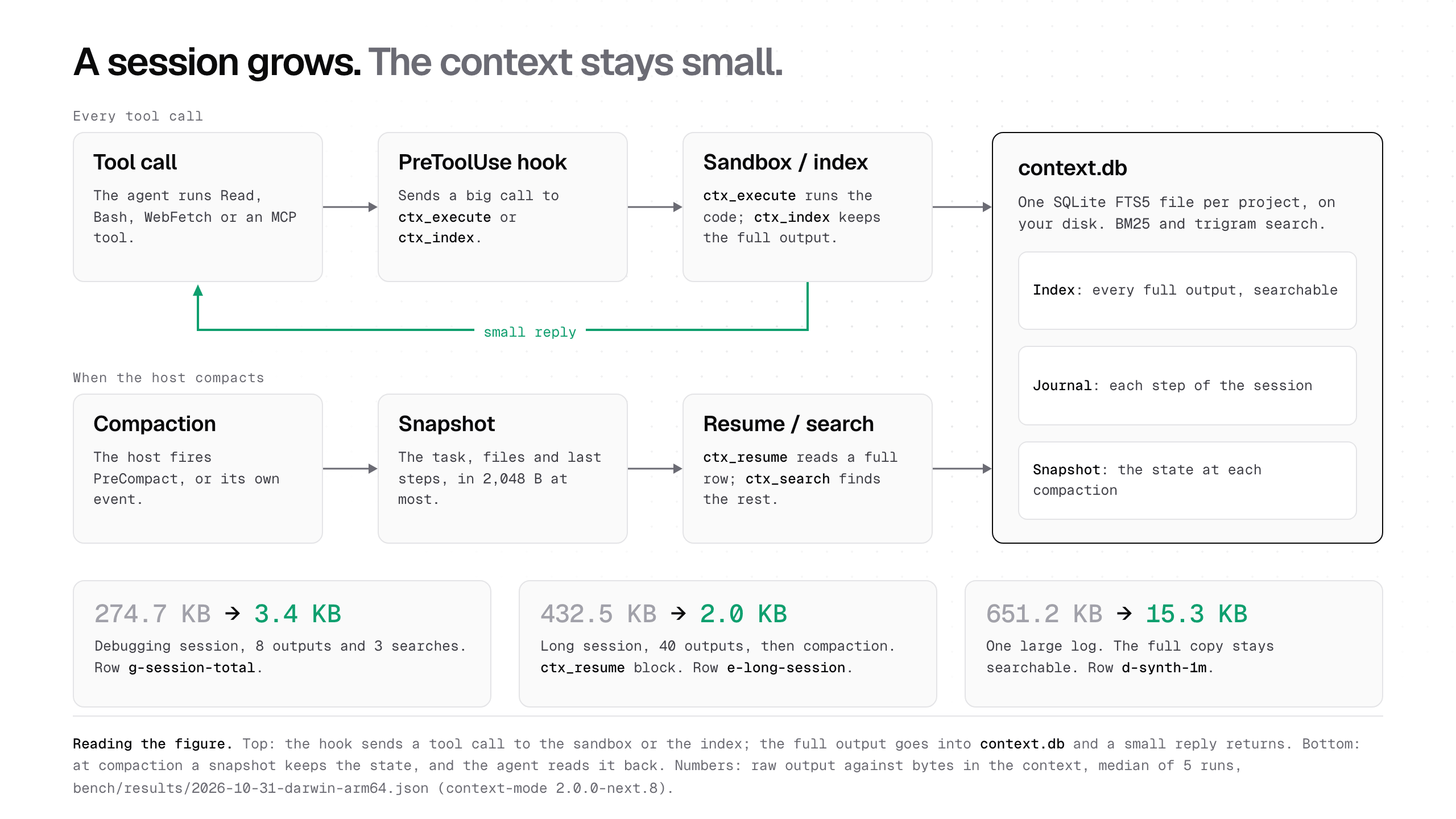
The diagram above comes from the official Context Mode README and describes this flow. It also presents measurements from a previous run, in version 2.0.0-next.8; these illustrative values should not be read as results from version 2.1.0.
Tip 5: measure savings and remove what you do not need to keep
Use ctx_stats to observe how much content stayed out of context. Then check if the change helped in real tasks in your repository, without treating an isolated number as a guarantee of speed or quality.
The project also documents ctx_purge to delete indexed data by session, source or project. Plan retention with your team, especially when logs or documents may contain internal information.
What the 99.4% benchmark actually measured
In the Context Mode README benchmark, the maintainer reports that a test from November 1, 2026 saved a median of 99.4% of bytes sent to the model across 36 lines with raw output of at least 10 KB. Each line uses the median of five runs, and the test is identified as version 2.0.0-next.23 on an Apple M1 Pro.
This result is a measurement published by the project itself, not an independent evaluation nor a result from version 2.1.0. It describes only that set of outputs and does not demonstrate that every repository will have the same savings.
The cover chart details categories such as sandbox, batch processing, externalization and hook redirection. Read the numbers alongside the sample and version, instead of turning the percentage into a universal promise.
License and security are also part of the evaluation
The repository uses the Elastic License 2.0 (ELv2) and describes itself as source-available. Read the license file before incorporating the code into a commercial or redistributed service, as there are specific limits for offering the software as a hosted or managed service.
The README states that the plugin data stays local and that code executed by ctx_execute runs on the machine with the user's permissions. In this project, “sandbox” means the output stays out of the model's context; it does not mean complete isolation from the operating system.
At the time of checking, the GitHub advisories page did not show any published advisories. This does not replace an audit or security policy, so keep the agent's permissions limited and test in a disposable repository before including sensitive data.
Frequently asked questions about Context Mode for programming agents
What does Context Mode do?
Context Mode keeps large tool outputs in a local index and returns smaller snippets to the agent when it searches. This reduces the need to repeat raw results in context.
Which agents are compatible with Context Mode?
The README documents integrations with Claude Code and Codex, among other agents. Check the official instructions for the version you choose before configuring the plugin.
Was the 99.4% benchmark done on version 2.1.0?
No. The 99.4% result was measured on November 1, 2026 with version 2.0.0-next.23, using 36 prompts and the median of five runs per prompt. It is a maintainer benchmark, not an independent test of version 2.1.0.
Is Context Mode open source?
The project describes itself as source-available and uses Elastic License 2.0. Read the terms before offering the software as a hosted service or redistributing it.
Is Context Mode's sandbox an operating system sandbox?
No. The README says that code executed by ctx_execute runs on the machine with the user's permissions. In this project, sandbox means keeping output out of the model's context, not isolating the operating system process.
Context Mode helps when tools produce large responses
Context Mode is most useful when the bottleneck is repeating extensive outputs and the agent needs to retrieve concrete parts later. It does not replace a good prompt, human review, or the agent's execution controls.
Start with a small task, measure context before and after, and confirm that the result preserves the necessary references. To coordinate planning, execution and review in the same project, orchestrate AI agents on bridgecode.
Source: Context Mode
Tags:#Context Mode#agentes de programação#MCP#contexto longo#SQLite#segurança de agentes
Developer and creator of bridgecode, an agentic development environment for orchestrating squads of AI agents. Helps people going from vibe coding to professional development move from idea to shipped product.
Related articles

Dicas
5 tips for reviewing interfaces with Impeccable
Use Impeccable commands to guide agents, review UX and detect visual patterns, but check permissions before enabling live mode.
6 min

Dicas
5 tips to give context to agents with NVIDIA Auto Ontology
Learn about NVIDIA Auto Ontology, an Apache 2.0 repository for giving semantic context to agents and the security considerations before adopting it.
6 min
Dicas
How to test AI agents in cloud operations with CloudOpsBench
CloudOpsBench releases 45 cloud operation tasks to test your AI agent. See how to clone, validate and run against an emulator or real AWS.
6 min