
llm-d 1.0 on Kubernetes is a distributed serving stack for language models, not a model nor a single command.

Dicas5 min
5 tips for using llm-d 1.0 on Kubernetes
Use llm-d 1.0 on Kubernetes with five checks for architecture, performance, tenants, observability and safe updates.

Marcelo Santiago
Criador do bridgecode
The biggest AI newsletter in the World
Get AI articles in your inbox
Technical curation on models, agents and coding tools. No spam, unsubscribe anytime.
The official guide was released on October 20, 2026. On October 31, the latest tag in the official repository was v1.0.0.
The release stabilizes the configuration API at v1 and highlights quality of service for multiple tenants and operations without downtime.
The announcement also lists agent aware serving. These capabilities make it important to plan operations, not just spin up containers.
In this article you will see:
- How to define the workload before choosing the topology.
- What to watch for when separating prefill from decode.
- How to use the v1 API and multi tenant controls.
- How to test upgrades and quality of service.
What llm-d 1.0 changes in model operations on Kubernetes
llm-d coordinates components to serve distributed inference on Kubernetes. The idea is to scale and route generation work across replicas, accelerators and different processing phases.
Version 1.0 is not a new language model. The project describes a v1 configuration API, quality of service (QoS) for multiple tenants and updates without downtime.
The release also lists agent aware serving, aimed at workloads that involve agents.
The term Day 2 describes what happens after initial deployment: monitoring service health, adjusting capacity, serving different priorities and updating components without interrupting use.
5 tips for using llm-d 1.0 on Kubernetes
Tip 1: define the workload before choosing the topology
Record average and maximum prompt size, output tokens, concurrency peaks and variation between tenants. A model used for short generation has different needs than one that receives long context.
Also define a service objective. For interactive conversations, measure time to first token; for batch processing, watch total throughput and completion time.
Tip 2: separate prefill and decode when the profile justifies it
Prefill processes the input tokens and prepares the context. Decode generates the response token by token. In a disaggregated architecture, the two phases can scale in separate groups.
The project repository publishes a 2P/2D throughput chart.
The figure compares Sidecar and Coordinator, two scheduling strategies, at concurrency levels 300, 360 and 420.
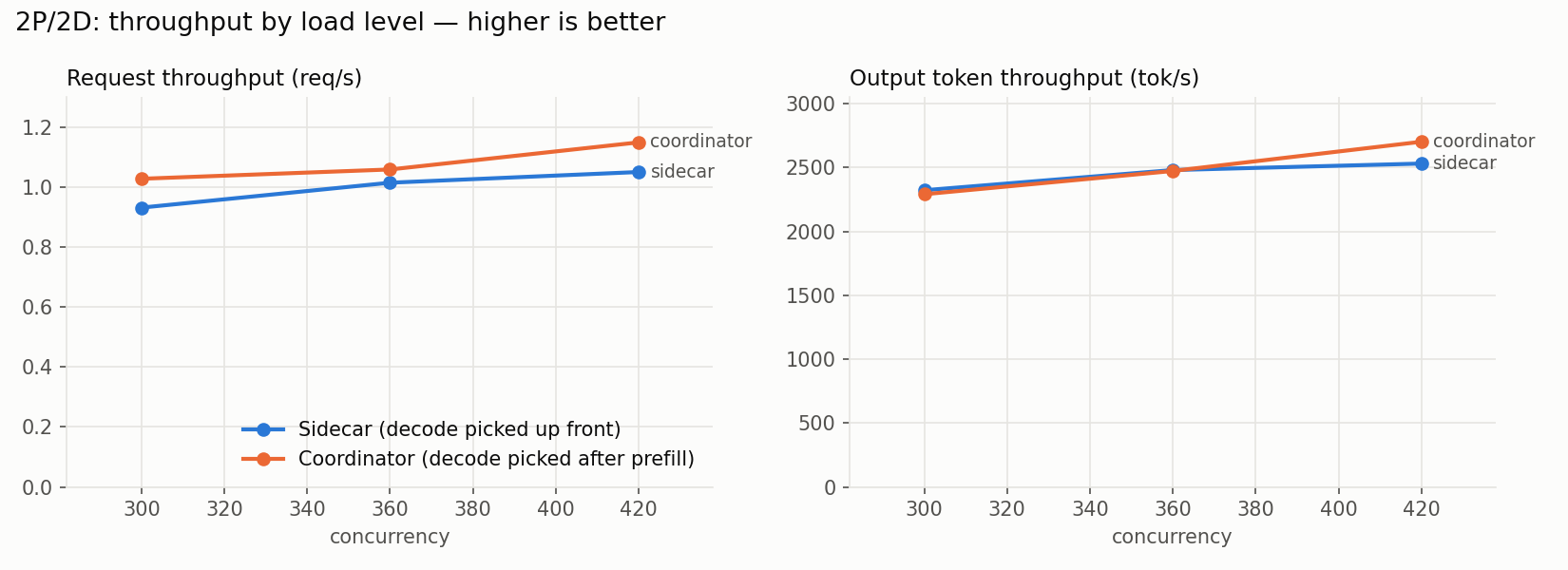
At level 420, the Coordinator curve is near 1.15 requests per second and 2,700 output tokens per second. The Sidecar curve is near 1.05 requests and 2,500 tokens per second.
These numbers are approximate readings from a specific project benchmark. Use the chart to learn which metrics to compare, not as a performance promise on your cluster or with another model.
Tip 3: keep version and configuration API aligned
As of the check on October 31, 2026, the official repository showed v1.0.0 as the latest tag. The release notes state that the configuration API reached stable v1.
Choose the tag and the corresponding documentation before installing. Avoid copying examples from the main branch without checking if the fields exist in the version used by your cluster.
Tip 4: configure QoS before splitting the cluster between teams
The multi-tenant quality of service in version 1.0 balances priorities when several tenants, or teams and services, share the infrastructure.
Before enabling it, define which workloads can wait and which need low latency.
Separate metrics by tenant and test traffic bursts, not just the average. This makes it easier to detect when one team's queue is hurting another or occupying accelerators without delivering the expected throughput.
Tip 5: rehearse updates and rollback under realistic load
The project highlights zero-downtime operations in version 1.0, but each environment has its own dependencies. Test an update with representative traffic and check model availability, queue and time to first token.
Define in advance how to roll back to the previous version and which signals stop the rollout.
Include serving agent-aware if the system runs agent tasks. Chained flows can pressure queues differently than a simple request.
How to compare llm-d with other inference serving approaches
llm-d prioritizes distribution and operation on Kubernetes.
For a local deployment on compact hardware, see the NVIDIA guide on local inference, which covers another infrastructure scale.
If the load includes agents that write software, combine serving observability with review of the work they do.
The guide to split and review agent tasks explains this flow from the project side.
No topology wins on every workload. Compare the same inputs, the same model and the same metrics; then repeat the test with concurrency and prompt and response ratios that represent real usage.
Frequently asked questions about llm-d 1.0 on Kubernetes
What is llm-d 1.0?
llm-d 1.0 is a distributed serving stack for language models on Kubernetes. The release highlights a v1 configuration API, multi-tenant QoS, zero downtime updates and agent-aware serving.
What is the current version of llm-d?
As of the check on October 31, 2026, the latest tag in the official repository was v1.0.0. Check the repository before starting a new deployment.
What do prefill and decode mean in LLM serving?
Prefill processes the prompt tokens and prepares the context. Decode generates the response token by token; separating the phases lets you scale the groups independently when the workload justifies it.
What does the llm-d 2P/2D benchmark show?
The chart compares request throughput and output tokens for Sidecar and Coordinator at three concurrency levels. The result is specific to that test and does not guarantee the same performance on another cluster.
Does the 2P/2D benchmark guarantee the same performance on my cluster?
No. It describes a specific case from the project. Measure your model, hardware, prompt, concurrency and latency requirements before choosing a topology.
llm-d 1.0 requires measuring the service after deployment
Version 1.0 brings together production focused features, but it does not choose the architecture for the operator. The topology depends on the traffic profile, tenant priorities, and latency targets.
Start with a bounded workload, track throughput and time to first token, and only then increase concurrency. This turns configuration into a hypothesis that can be measured, reviewed and reverted.
You define the goal and the agents split the tasks: one plans, another executes, another reviews. See how orchestration works at bridgecode.
Source: llm-d
Tags:#llm-d#Kubernetes#inferência distribuída#prefill#decode#QoS
Developer and creator of bridgecode, an agentic development environment for orchestrating squads of AI agents. Helps people going from vibe coding to professional development move from idea to shipped product.
Related articles
Dicas
How to test AI agents in cloud operations with CloudOpsBench
CloudOpsBench releases 45 cloud operation tasks to test your AI agent. See how to clone, validate and run against an emulator or real AWS.
6 min

Dicas
Tencent's Hy4: 1M context, vision and tool calling
Tencent's Hy4 brings 1 million tokens of context, vision and native tool calling for code agents and long duration tasks.
5 min

Dicas
5 tips to operate desktop with agent-desktop
Vercel Labs launched agent-desktop, a tool that lets AI agents operate desktop applications via the accessibility tree. See how it works.
6 min