
Creating video with AI today doesn't depend on a single paid tool. GitHub hosts open projects that generate clips, assemble short videos, and handle editing entirely through code. I reviewed five of them on 11/24/2026, checking license, stars, and activity.
Dicas6 min
5 best GitHub repositories for creating videos with AI
Compare 5 open source repositories for creating videos with AI: ComfyUI, Remotion, LTX-2, MoneyPrinterTurbo, and MoviePy. License, stars, and usage example.
The biggest AI newsletter in the World
Get AI articles in your inbox
Technical curation on models, agents and coding tools. No spam, unsubscribe anytime.
The choice shifts based on the goal: generating moving images with a model, automating short videos for social media, or editing and rendering via code.
In this article you'll see:
- Five repositories for creating videos with AI, with verified license and activity
- Who each one is for and a usage example
- How to combine the projects into a single workflow
- Precautions before running third-party code
How I picked the 5 AI video repositories
To make the list, a project needed a public official repository, a README with instructions, an identifiable license, and a commit within the last 180 days. All data came from GitHub on 11/24/2026.
I discarded popular projects without recent activity. Wan2.1 (last commit in March) and Open-Sora (April) were excluded for this reason. The LTX-Video repository was also left out: its README states the project is legacy, and the current version is in LTX-2.
1. ComfyUI: the visual node editor for video generation
ComfyUI is a node-based interface for building image, video, audio, and 3D generation pipelines. It has about 148k stars, a GPL 3.0 license, and a commit on 11/24/2026.
The README lists support for video models like Wan 2.1 and 2.2, LTX-Video 2 and 2.3, HunyuanVideo 1.5, and Mochi. It also notes that it runs large models with as little as 4 GB VRAM and 8 GB RAM, using asynchronous weight streaming.
Who it's for: anyone who wants to test multiple open models without writing code.
Usage example: load a text-to-video workflow from the ComfyUI workflows library, swap the prompt, and compare the output of two models in the same workflow.
2. Remotion: video as code with React
Remotion creates videos programmatically with React. It has about 75k stars and a commit on 11/24/2026. The README also presents the workflow for creating videos with an agent.
The license is custom, not a standard one. According to the license file, individuals, for-profit companies with up to 3 employees, and non-profit organizations use it for free. Larger companies need an enterprise license.
Who it's for: developers who want to version video in Git and render in batches.
Usage example: create a project with the command from the README and ask a code agent to generate an intro animation.
Terminal
npx create-video@latest3. LTX-2: open video and audio model
LTX-2 is the official inference and LoRA training package for Lightricks' audio and video model. It has about 10k stars, an Apache 2.0 license, and a commit on 11/19/2026.
According to the README, the model generates synchronized audio and video. The quickstart uses uv to install and downloads the LTX-2.5 weights from Hugging Face, roughly 66 GiB. It requires accepting the model terms.
Who it's for: anyone with a GPU who wants to run video generation with audio locally.
Usage example: clone the repository, install dependencies, and run the distilled pipeline with your clip's prompt.
Terminal
git clone https://github.com/Lightricks/LTX-2.git
cd LTX-2
uv sync --extra natten4. MoneyPrinterTurbo: short video from a topic
MoneyPrinterTurbo generates an HD short video from a topic or keyword. According to the README, it creates the script, selects scenes, assembles subtitles and music, and exports the result.
It has about 145k stars, an MIT license, and a commit on 11/22/2026. It has a web UI and API, and runs on Windows, macOS, and Linux.
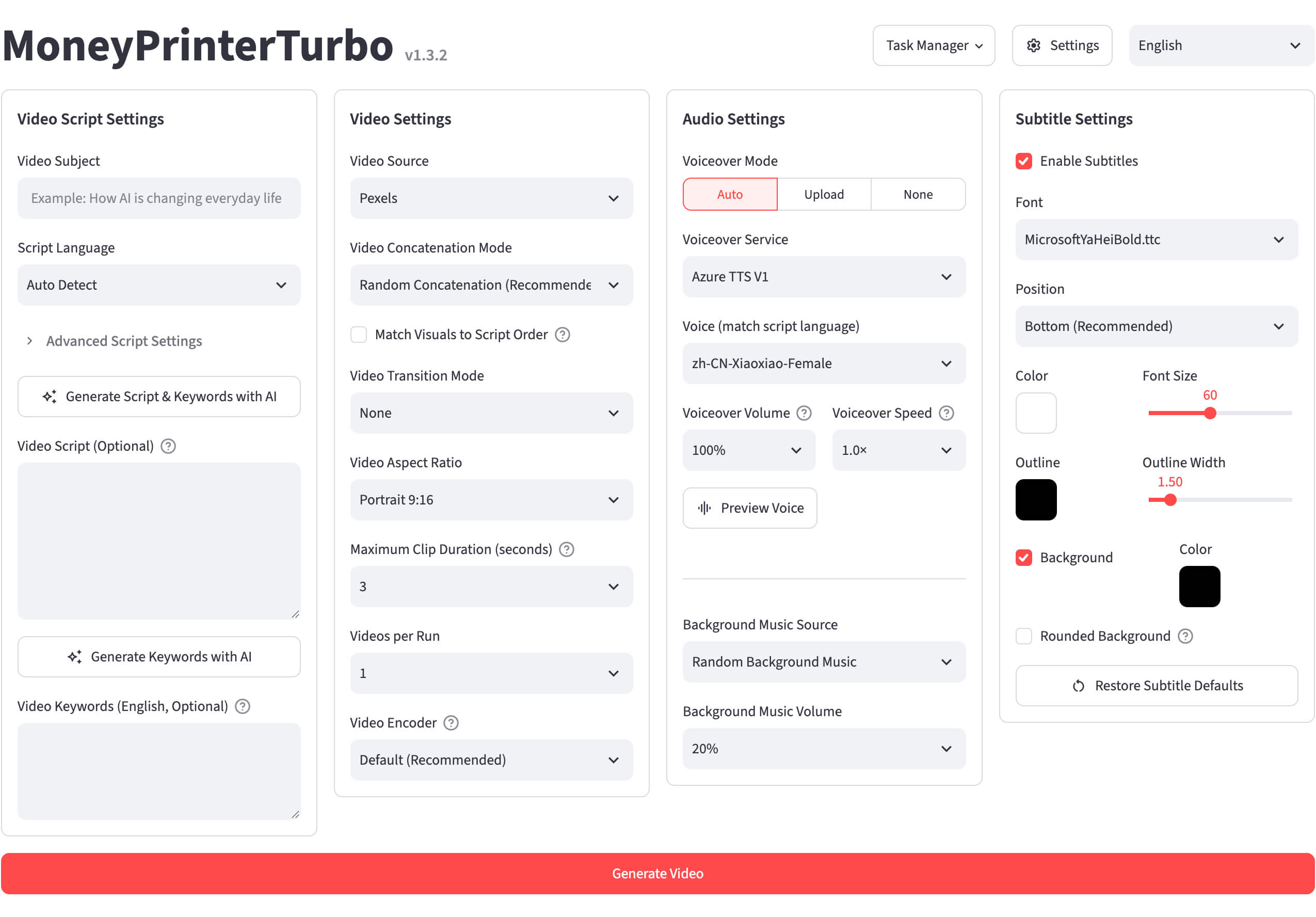
Who it's for: creators who publish short videos frequently.
Usage example: enter a topic in the web UI, choose the language model configured with your key, and review the script before exporting.
5. MoviePy: video editing in Python
MoviePy is a Python library for cuts, concatenation, titles, and video composition. It has around 15 thousand stars, an MIT license, and a commit on 08/26/2026, within the 180-day window.
The README notes that version 2.0 introduced breaking changes and that version 1 is no longer maintained. It also warns that it is slower than using ffmpeg directly.
Who it's for: anyone who wants to automate post-production for clips generated by another model.
Usage example: the code below, adapted from the README, cuts a segment and overlays a title.
Python
from moviepy import VideoFileClip, TextClip, CompositeVideoClip

clip = VideoFileClip("example.mp4").subclipped(10, 20)
txt = TextClip(font="Arial.ttf", text="Olá!", font_size=70, color="white").with_duration(10).with_position("center")
CompositeVideoClip([clip, txt]).write_videofile("result.mp4")
Summary of the 5 repositories
- ComfyUI: GPL 3.0, around 148 thousand stars, visual interface
- MoneyPrinterTurbo: MIT, around 145 thousand stars, automatic short video
- Remotion: custom license, around 75 thousand stars, video as code
- MoviePy: MIT, around 15 thousand stars, editing in Python
- LTX-2: Apache 2.0, around 10 thousand stars, video and audio model
If you want to know which model produces the best results, see Code2Video-AA, which compares 27 models on code videos. For a cloud video option, read about Gemini Omni 1.2 Flash, which generates videos up to 15 seconds.
How to combine the repositories into a single workflow
The projects complement each other. A possible flow: generate clips with LTX-2 or in ComfyUI, assemble and subtitle with MoviePy, and use Remotion for intros and animated graphics.
MoneyPrinterTurbo covers the short path, from topic to finished video. Use each project in a separate folder or branch to avoid mixing dependencies.
For the code behind these workflows, also check out the 5 best GitHub repos for vibe coding.
Precautions before running third-party code
Read the code and dependencies before installing. Prefer an isolated environment, do not paste API keys into projects you haven't reviewed, and never run commands from a repository without understanding what each one does.
Also check the model's license and the license of the materials used. A code license does not guarantee commercial usage rights for the generated video.
Frequently asked questions about repositories for creating videos with AI
What is the best GitHub repository for creating videos with AI?
It depends on what you need. MoneyPrinterTurbo is the shortest path to short videos from a topic, ComfyUI is the most flexible for generating clips with open models, Remotion is for video as code, and MoviePy is for editing in Python.
Do I need a GPU to generate video with AI locally?
For generation models like LTX-2, yes, and the weight download recommended in the README is about 66 GiB. ComfyUI states it can run even large models with 4 GB of VRAM, at reduced speed. Remotion and MoviePy do not generate video with their own models and run on a regular machine.
Are these repositories truly open source?
Almost all of them. According to GitHub metadata consulted on 11/24/2026, LTX-2 uses Apache 2.0, MoneyPrinterTurbo and MoviePy use MIT, and ComfyUI uses GPL 3.0. Remotion has its own license and requires a company license for for-profit organizations with more than 3 people.
Can I use videos generated by these projects for commercial work?
It depends on the code license and also on the model license and the assets used. Read the repository license, the model terms on Hugging Face, and the license of any stock image or music library before publishing.
Is it safe to run these repositories on my computer?
Read the code and dependencies before installing, prefer isolated environments, and never paste API keys into projects you haven't reviewed. All five are active, public projects, but that does not replace your own review.
Which repository to choose for creating videos with AI
Start with the goal. To generate clips with open models, go with ComfyUI or LTX-2. For automatic short video, MoneyPrinterTurbo. For version-controlled video in code, Remotion. For post-production in Python, MoviePy.
All data in this list was verified in the official repositories on 11/24/2026 and changes over time.
Sell a digital product or service? Build an agent squad on bridgecode that works with you every day, running tools like these side by side.
Source: GitHub
Tags:#vídeo com IA#GitHub#open source#ComfyUI#Remotion

Developer and creator of bridgecode, an agentic development environment for orchestrating squads of AI agents. Helps people going from vibe coding to professional development move from idea to shipped product.
Related articles
Dicas
5 best GitHub repositories for vibe coding in 2026
Compare 5 open source repositories for vibe coding: bolt.diy, open-lovable, Dyad, Cline, and OpenHands. License, stars, activity, and usage example for each.
6 min
Dicas
Top 3 GitHub repositories for terminal code agents
Compare Codex CLI, OpenCode, and Kilo Code: license, stars, installation, and a usage example from each open-source code agent repository.
5 min
Dicas
Claude Code: how to block edits to .env and protected files with a hook
Use a PreToolUse hook with exit 2 to prevent Claude Code from editing .env, package-lock.json, and .git, and to block dangerous Bash commands. Includes the limits of this protection.
6 min