
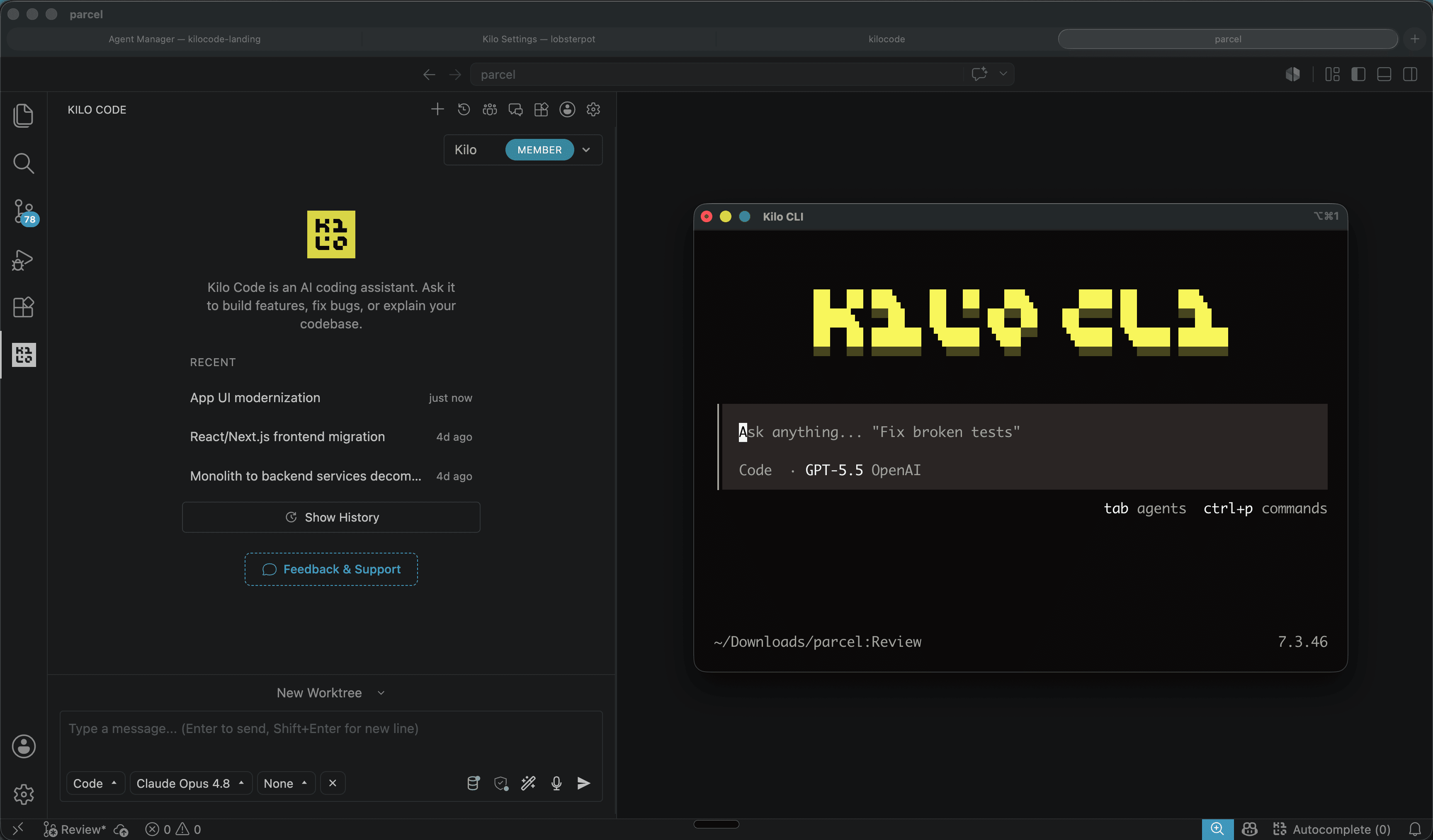
Kilo Code is an open source code agent that runs where you already work: VS Code, JetBrains and terminal. The project is on GitHub at Kilo-Org/kilocode, under MIT license, and presents itself as the most popular open source code agent, with more than 500 models available.
Dicas6 min
Kilo Code: open source coding agent for VS Code and CLI
Kilo Code is an open source coding agent for VS Code, JetBrains and CLI, with more than 500 models and provider direct pricing.

Marcelo Santiago
Criador do bridgecode
The biggest AI newsletter in the World
Get AI articles in your inbox
Technical curation on models, agents and coding tools. No spam, unsubscribe anytime.
The proposal is simple: you choose the model, switch in the middle of the task and pay the provider rate, with no markup. No API key is needed to start. The account gives access to models like GPT-6 Astra, Claude Fable 5.1, Gemini 3.8 Flash, Grok 4.6 and DeepSeek V4.1 Flash, all at provider price.
In this article you will see:
- What Kilo Code does and where it runs
- How to install on VS Code, terminal and via CLI
- How model selection and switching works
- What the MIT license means in practice
- How it compares to other code agents

What Kilo Code does
Kilo Code is an engineering agent that plans, writes and adjusts code inside your editor or terminal. It reads the repository, proposes changes and runs commands, with you in control of each step.
The difference from traditional extensions is model flexibility. Instead of tying you to a single provider, Kilo Code lets you choose between more than 500 models and switch between them in the middle of a task. One model can plan, another can implement and another can review, without leaving the same flow.
See also how use the Codex CLI in your workflow and how Claude Code 2.1.319 organizes MCP in the background.
How to install
In VS Code, install the Kilo Code extension directly from the Marketplace or via the link vscode:extension/kilocode.Kilo-Code. After creating the account, you already have access to the models.
In the terminal, the fastest path is npm:
Terminal
npm install -g @kilocode/cliIt also works with curl, pnpm or bun:
Terminal
curl -fsSL https://kilo.ai/cli/install | bashTerminal
pnpm add -g @kilocode/cliTerminal
bun add -g @kilocode/cliThe main project is at github.com/Kilo-Org/kilocode. New features go to the v2 branch; the main branch receives fixes for the current release. Before contributing, check which branch the team is accepting.
How model selection works
A Kilo Code account gives access to more than 500 models. Billing is the provider rate, with no markup. This changes the equation for people who test models: instead of paying a subscription per tool, you pay for the actual use of each model.
Switching in the middle of a task is the strong point. If a model is good at planning but weak at refactoring, you switch to a second one when writing code. This brings the workflow closer to an agent squad, where each role uses the most suitable model.
What the MIT license means
The repository is MIT. In practice, this means you can use, modify and distribute the code, including in commercial projects, as long as you keep the copyright notice. For teams that need to audit or adapt the tool, the permissive license reduces legal friction.
The combination of open source with direct provider pricing makes Kilo Code an interesting option for those who want control over the agent without giving up top models.
How it compares to other agents
Kilo Code does not try to be the only agent. It competes with Claude Code, Codex CLI and Gemini CLI, among others. The difference is in model flexibility and direct provider pricing.
If you already use a specific agent and are satisfied, there is no reason to switch. If you want to test several models in the same flow without changing tools, Kilo Code is worth a test. The cost of experimenting is low: installation takes minutes and does not require an initial API key.
For teams that already have a flow with Claude Code or Codex, Kilo Code can come in as a comparison tool. Running the same prompt in two agents and comparing the result is a cheap way to calibrate which model performs best in your code.
How to test today
- Install the extension in VS Code or the CLI in your terminal.
- Create an account and pick a starting model, such as DeepSeek V4.1 Flash or Gemini 3.8 Flash.
- Open a small repository and ask for a simple task, like adding a test.
- Switch models mid task and compare the results.
- Read the README and open issues before adopting in production.
Frequently asked questions about Kilo Code, open source coding agent
Is Kilo Code free?
The code is open source under the MIT license. Charges are the provider rate for each model, with no markup, and there is no mandatory subscription to get started.
Do I need an API key to use Kilo Code?
Not to get started. An account gives access to more than 500 models, and your own keys are optional if you want to use specific providers.
Which editors does Kilo Code run on?
VS Code, JetBrains and terminal, via CLI installable with npm, pnpm, bun or curl.
Can I switch models in the middle of a task?
Yes. Kilo Code lets you choose from more than 500 models and switch between them during execution, paying the provider rate.
What license is Kilo Code under?
MIT. It allows use, modification and distribution, including commercial use, while keeping the copyright notice.
Conclusion
Kilo Code is another option in the code agent ecosystem, with the advantage of being open source and not locking you to a single model. For anyone who wants to compare models in the same workflow, it's a good starting point.
The recommendation is to test it on a small project before adopting it in production. Check out the repository, read the README and review the open issues to understand the development pace.
Source: Kilo Code
Tags:#radar#ia
Developer and creator of bridgecode, an agentic development environment for orchestrating squads of AI agents. Helps people going from vibe coding to professional development move from idea to shipped product.
Related articles
Dicas
MCP Inspector: How to Test and Debug MCP Servers Locally
MCP Inspector is the reference tool for testing and debugging MCP servers in the browser, CLI and terminal. See how to install and use it in CI.
7 min

Dicas
How to use SuperCLUE to choose an AI model
The November 2026 SuperCLUE covers 19 models and category leaders. This guide shows how to use the category view to pick the right model.
5 min
Dicas
How to migrate Agents SDK v0.33.0 to Pi 1.5
Agents SDK v0.33.0 updates PiHarness to Pi 1.5. See the changed APIs, rollback risks, and a validation roadmap.
6 min