
When an agent receives a broad objective, it can mix research, data transformation and conclusions that are hard to audit. Without clear steps, traceable sources and reproducible checks, it is also difficult to know if the task is finished.

Dicas6 min
5 tips to organize agents with Google Antigravity
Learn from Google DeepMind how to separate research, deterministic calculations and human validation in an agent workflow in Google Antigravity.

Marcelo Santiago
Criador do bridgecode
The biggest AI newsletter in the World
Get AI articles in your inbox
Technical curation on models, agents and coding tools. No spam, unsubscribe anytime.
The cost shows up when a task looks completed, but no one knows where the data came from or which tools ran the calculations.
In code, this becomes slow review; in research, it can compromise a hypothesis.
On November 3, 2026, Google DeepMind published a chemoinformatics workflow with Google Antigravity.
According to the team, the agent researched thousands of compounds, organized data and proposed analyses in about an hour. A similar iteration usually takes several days.
The example does not prove the efficacy of a drug nor replace laboratory tests.
It shows how to divide work between agent, deterministic tools and scientific review, a useful structure also for those who build software with AI.
In this article you will see:
- How to define a verifiable deliverable for the agent.
- How to separate research, data and reproducible calculations.
- How to evaluate results without confusing hypothesis with proof.
- How to test the Science plugin in the Google Antigravity app.
5 tips for organizing agents in Google Antigravity
Tip 1: describe the deliverable before asking for execution
A goal like “research this topic” leaves too much room for the agent to decide what counts as success. Specify the question, the allowed data, the expected files, and what needs human approval.
In the Google DeepMind case, the task was to research literature on compounds related to crizotinib and lorlatinib.
Then it was necessary to extract molecules and associated data and prepare the set for analysis. This scope makes the request evaluable.
For software, specify expected behavior, allowed modules, tests, and scope limits. For broad tasks, ask for a plan before editing.
Tip 2: preserve the origin of each data point
The agent can consult articles, catalogs and documentation, but the response should not erase the audit trail. Keep source, identifier, transformation, and reason for keeping or excluding each record.
The scientific demo deals with different chemical representations, such as names, structures in patents, and SDF files. The team reports that the agent filtered irrelevant compounds, logged the sources, and prepared data for analysis.
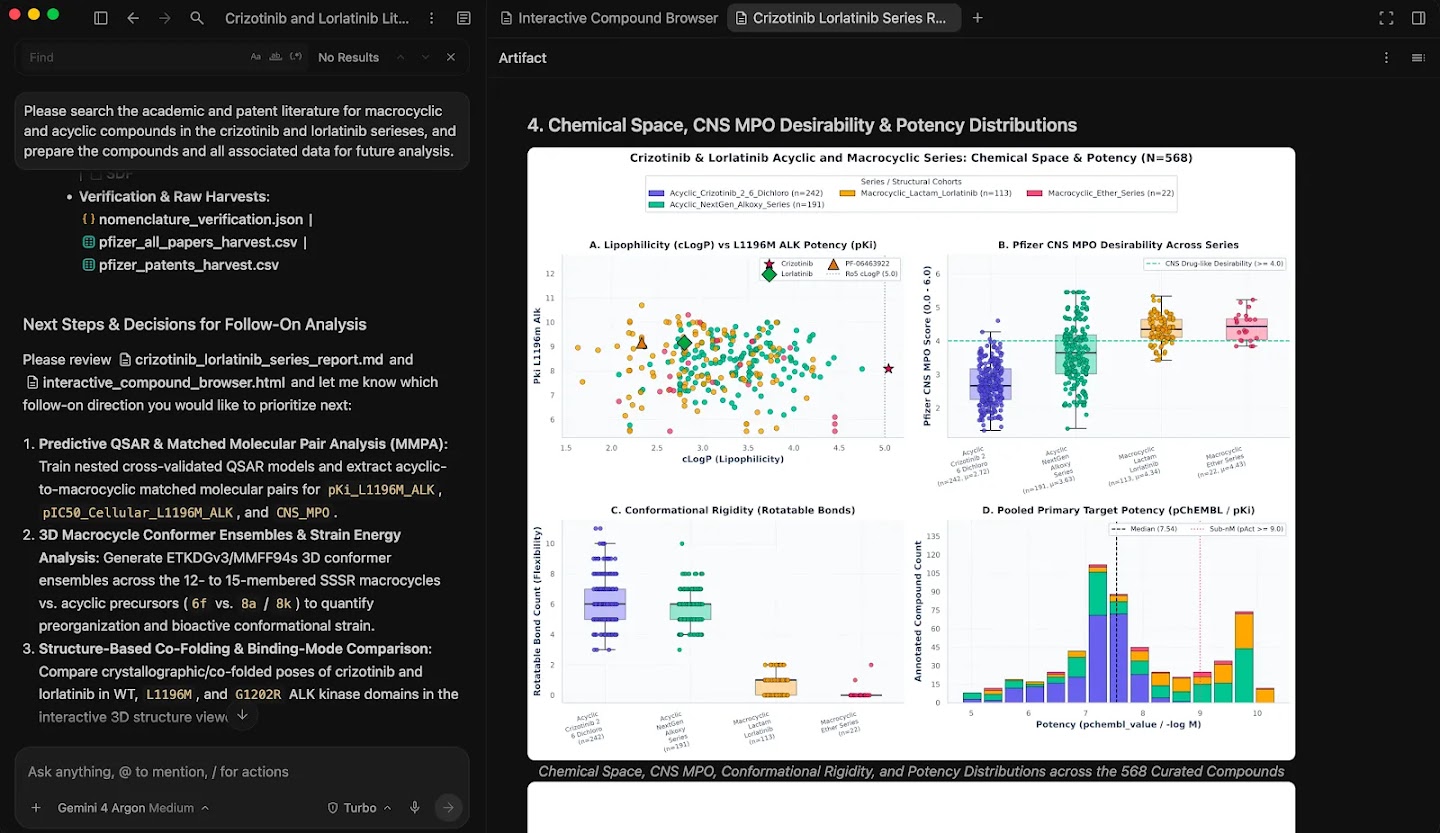
Image credit: Google DeepMind.
In code, preserve the origin of requirements, examples, and dependencies. Ask the agent to separate input data, generated files, and conclusions, instead of returning only a summary without references.
Tip 3: leave calculations to deterministic tools
A language model can coordinate steps, navigate sources, and explain decisions. That does not mean it should replace a specialized library when the task requires calculations that need to be repeated and verified.
In Antigravity, the model organizes the flow, while deterministic tools execute molecular calculations. The example uses RDKit and connections to ChEMBL and PubChem, according to Google DeepMind.
The same idea applies in development. Use the agent to propose changes, but delegate compilation, tests, lint, and type checks to reproducible tools.
The agent can interpret a failure, not invent that the test passed.
Tip 4: test generalization, not just the known set
An evaluation looks convincing when it mixes similar examples between train and test. To find out if the method works on new cases, keep a data split that reduces this leakage and record the rule used.
The paper prefers chronological splits when dates are available. Otherwise it uses scaffold split, which separates molecules by core structures to test cases different from those seen in training.
The figure from Google DeepMind compares four evaluations. In software, also test scenarios that did not guide the implementation.
Tip 5: treat the output as a hypothesis until it passes review
Ask the agent to separate observations, inferences, and pending decisions. The conclusion should say what the data supports, what is still missing to measure, and what requires human review.
Google DeepMind itself notes that sparse data, differences between lab assays, and limited dynamic ranges reduce model accuracy. Computational designs are testable hypotheses, not ready medicines.
In a repository, the equivalent barrier is reviewing the diff, running tests, and confirming security requirements before merging.
To learn about the app, also see the overview of Google Antigravity published on the blog.
What the Google Antigravity example shows, and what it does not show
The team reports that the agent searched thousands of compounds and assembled a curated set of 568 records for analysis. An interactive interface allowed exploring metadata and relationships between potency and number of rotatable bonds.
Next, the workflow compared pairs of molecules, built potency models across different architectures, and evaluated the results on separate data.
Based on the analyses, the agent suggested molecules and possible synthesis routes for further investigation.
The speed claim comes from the team itself: a task that usually takes several days per iteration was done in about an hour.
This is not an independent benchmark nor a controlled comparison with other platforms.
A suggested molecule is not therefore safe or effective. The publication says each design needs to be synthesized and validated experimentally.
Computational results are meant to guide the researchers' next question.
How to test the Science plugin in Google Antigravity
The path described by the team is to install the Science plugin via the Customizations marketplace inside the Google Antigravity app.
The plugin bundles cheminformatics skills and access to scientific tools. Availability may depend on the account and environment.
Start with a limited question and a public source. Ask the agent to show the records found, the filtering criteria and the files produced, without mixing everything into a final answer.
Ask for a reproducible analysis and keep calculations in domain tools. Record inputs, versions, criteria and limitations for human review before acting.
If you want to understand the terminal command for the Antigravity family, see the Antigravity CLI guide in VS Code.
This tutorial covers the CLI agy, not the Google Antigravity app used in the scientific workflow.
The official demo video shows the research, analysis and candidate creation in the Antigravity environment:
Frequently asked questions about Google Antigravity with Science plugin
What is the Science plugin for Google Antigravity?
It is a set of cheminformatics skills to use in the Google Antigravity app, connecting scientific research to analysis tools.
Did the Antigravity workflow discover an effective drug?
No. The publication reports computational suggestions that still need to be synthesized and validated experimentally.
How many compounds were curated in the Google DeepMind example?
The team reports a curated set of 568 compounds for further analysis.
Is Google Antigravity the same as Antigravity CLI?
No. The article describes the Google Antigravity app; Antigravity CLI is a separate tool started with the `agy` command.
How to test the scientific workflow in Google Antigravity?
The team recommends installing the Science plugin via the Customizations marketplace in the Google Antigravity app, with availability depending on account and environment.
How agent workflows become more reliable for developers
The main lesson is not to ask an agent to do everything. It is to split the work into verifiable steps, preserve data provenance, and use deterministic tools for operations that require consistency.
Start with a small task, record the success criteria and review the output before integrating it into the project. That way, AI accelerates exploration without hiding the difference between a suggestion and a confirmed result.
From draft to finished product: split the work among specialist agents and track each step on bridgecode.
Source: Google DeepMind
Tags:#Google Antigravity#quimioinformática#fluxo de agentes#RDKit#Google DeepMind
Developer and creator of bridgecode, an agentic development environment for orchestrating squads of AI agents. Helps people going from vibe coding to professional development move from idea to shipped product.
Related articles
Dicas
How to test AI agents in cloud operations with CloudOpsBench
CloudOpsBench releases 45 cloud operation tasks to test your AI agent. See how to clone, validate and run against an emulator or real AWS.
6 min

Dicas
Tencent's Hy4: 1M context, vision and tool calling
Tencent's Hy4 brings 1 million tokens of context, vision and native tool calling for code agents and long duration tasks.
5 min

Dicas
5 tips to operate desktop with agent-desktop
Vercel Labs launched agent-desktop, a tool that lets AI agents operate desktop applications via the accessibility tree. See how it works.
6 min