
Cursor announced on October 26, 2026, at 7:02 PM Brasília time, that DeepSeek V4.1 Flash 1017 is now available in the editor. On CursorBench 4.0, Max mode scored 47.7%, with an estimated average cost of US$ 0.98 per evaluated task.
DeepSeek V4.1 Flash scores 47.7% on CursorBench 4.0
Cursor released DeepSeek V4.1 Flash 1017; on CursorBench 4.0, Max mode scored 47.7% at an average cost of US$0.98 per task.

Marcelo Santiago
Criador do bridgecode
The biggest AI newsletter in the World
Get AI articles in your inbox
Technical curation on models, agents and coding tools. No spam, unsubscribe anytime.
The news matters to developers working with code agents because the result combines score, configurable effort and cost per task. Cursor itself presents the model as part of its cost and performance frontier.
In this article you will see:
- What changed with the arrival of DeepSeek V4.1 Flash to Cursor
- How to read the results of CursorBench 4.0
- What the table measures and what its limits are
- How to activate the model and compare the result in your project
DeepSeek V4.1 Flash 1017 arrives in Cursor model options
The official Cursor announcement states that DeepSeek V4.1 Flash is available in the editor's model selector. To find it, open Cursor settings and go to Models, as per the publication of the Cursor team on X.
The name that appears in the evaluation is DeepSeek V4.1 Flash 1017. The fact confirmed by this publication is the availability inside Cursor. It does not announce, by itself, a new model version nor detail all plans or regions where the option appears.
The publication also associates the model with CursorBench 4.0, the evaluation maintained by Cursor itself. Therefore, it is worth separating two things: the arrival of the model in the editor is availability information; the score is a measurement made on the company's benchmark.
Those who follow Cursor's agents and tools can also see the announcement of the Cursor Agent SDK to create agents in TypeScript. To understand how hardware results are presented in agentic tasks, see the NVIDIA Vera benchmark in agent loops.
CursorBench 4.0 shows 47.7% in Max mode
On the public page of CursorBench 4.0, DeepSeek V4.1 Flash 1017 appears in four effort levels. Max mode reaches 47.7% and appears in position 17 on that list. Medium, High and Low modes are between 44.9% and 46.3%.
| Effort | Score | Average cost per task | Average tokens | Average steps | Position |
| Max | 47.7% | US$ 0.98 | 537.047 | 187 | 17 |
| Medium | 46.3% | US$ 0.80 | 398.255 | 189 | 21 |
| High | 45.6% | US$ 0.77 | 385.196 | 186 | 24 |
| Low | 44.9% | US$ 0.60 | 290.651 | 161 | 27 |
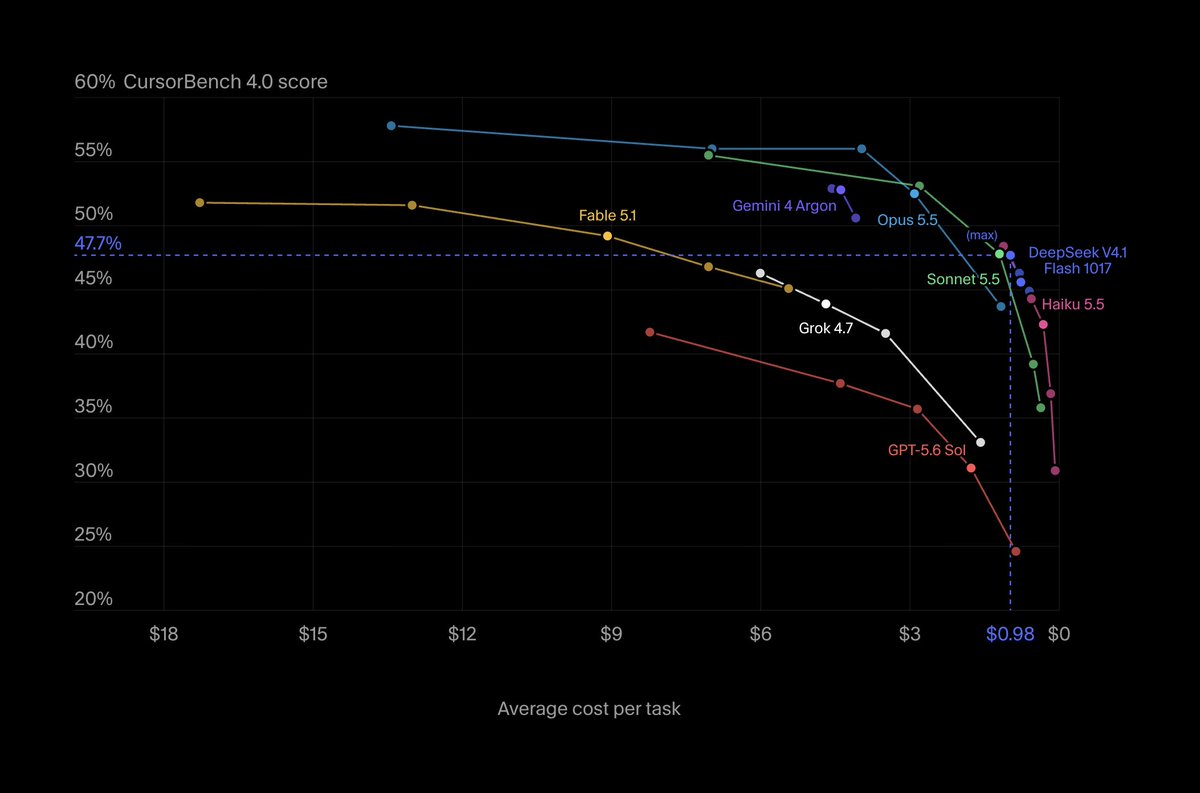
The image comes from the official Cursor publication. The vertical axis shows the benchmark score and the horizontal, the average cost per task. The curve makes visible that the result changes according to the selected effort level.
The evaluation also reports average tokens and steps. These data help explain why the cost of Max mode is higher than Low. They are not an API rate nor a subscription price, they are estimates associated with the tasks used by Cursor in this comparison.
What CursorBench measures and what it does not allow to conclude
CursorBench 4.0 was designed by Cursor to evaluate programming tasks done in its environment, including long running work that can touch more than one file. This brings the test closer to some real workflows, but it does not turn the result into a universal measurement of code quality.
A score of 47.7% does not mean the model will solve that proportion of any request made by a team. It describes performance on Cursor's suite, with its tasks, evaluation criteria, settings and way of calculating costs.
The ranking position is also a snapshot of the list shown on the page consulted, not a guarantee that the same model will occupy the same position in another version of the benchmark. For a fair comparison, record the date, the page version, the effort level and the task used.
The difference between modes is not a simple scale where "more effort" always increases the score. Medium scores 46.3%, while High scores 45.6%. This may reflect the composition of the tasks and the specific execution, not a general rule for all code.
Treat the numbers as a signal for what to test, not as a promise of results. Cursor publishes the benchmark and therefore the comparison is useful to evaluate the editor ecosystem, but it is not equivalent to an independent audit done by a third party.
How to test DeepSeek V4.1 Flash in Cursor
Open Settings, go to Models and look for DeepSeek V4.1 Flash. Cursor says this is the area where the model can be activated. If the option does not appear, the publication does not explain whether this depends on account, region or gradual rollout; check the information shown by the editor itself.
Choose a representative task from your repository, for example investigating a bug that spans related files, and describe the expected behavior. Keep the same prompt, the same branch and the same criteria when comparing the model with another option.
Before accepting changes, review the diff, run the project tests and check edge cases. A response that compiles can still change a business rule or leave a validation incomplete. The test is meant to observe the result in your context, not to replicate the official scoreboard.
Note the effort level, the time to response, the files changed and whether the solution passed the existing tests. If you use cost as a criterion, treat the CursorBench value only as a reference from the public test, not as a forecast of your bill.
Frequently asked questions about DeepSeek V4.1 Flash 1017 on CursorBench
Is DeepSeek V4.1 Flash already available in Cursor?
Yes. Cursor announced on October 26, 2026 that the model can be selected in Settings, under the Models section.
What was the score of DeepSeek V4.1 Flash 1017 on CursorBench?
Max mode scored 47.7% on CursorBench 4.0. Medium, High and Low modes ranged between 44.9% and 46.3%.
Is the US$0.98 cost the price of Cursor?
No. It is the average per task estimate in the CursorBench 4.0 result for Max mode, not a subscription or API rate.
Is CursorBench an independent benchmark?
No. It is an evaluation maintained by Cursor. Its results help compare options in the context of the editor, but they do not equal an independent evaluation.
How to enable DeepSeek V4.1 Flash in Cursor?
Open Settings, go to Models and look for DeepSeek V4.1 Flash. Cursor's official publication does not detail availability conditions by account or region.
DeepSeek V4.1 Flash favors a cost and quality test
CursorBench positions DeepSeek V4.1 Flash 1017 as a competitive option in cost per task, with scores close across effort levels. The scoreboard does not place it as an absolute leader in every measure, but it gives a concrete starting point to evaluate the model.
For those who code with Cursor, the next step is to repeat real tasks and decide based on quality, review needed and performance in your own repository. Did DeepSeek V4.1 Flash catch your attention? Put this new feature to work in an agent squad on bridgecode, with distributed tasks and steps tracked in the same flow.
Source: Cursor
Tags:#radar#ia
Developer and creator of bridgecode, an agentic development environment for orchestrating squads of AI agents. Helps people going from vibe coding to professional development move from idea to shipped product.
Related articles

Benchmarks
Co-Design Bench: code agents get 26% of real world tasks right
Researchers built a code agent benchmark based on real user requests. Even the best model fully completes only 26.4% of tasks. See the numbers.
7 min

Benchmarks
PLE: physical engineering benchmark for AI agents
Google Cloud launched the Physical-Engineering Last Exam, an 85 task physical engineering benchmark. Every model scored below 50%. See the numbers.
7 min

Benchmarks
VIALS-AA: Benchmark for Reasoning on Scientific Images
Artificial Analysis launched VIALS-AA, an implementation of Handshake AI's VIALS benchmark, which tests whether models can interpret scientific images and answer based on the evidence.
4 min